Box TIAGo Pro
Put TIAGo Pro in the boxing position
To box the robot the torso lift joint has to reach the lower joint limit. There is a special pre-programmed motion for that. A way to trigger this motion is via the WebGUI.
In your device’s WiFi settings, connect to the robot’s access point:
Network name (SSID): tiago-pro-<SN>
Password: R0b0t1c@
Connect to the web-user-interface with the robot’s serial number (<SN>):
Enter this address in your browser: http://tiago-pro-<SN>c
Username: pal
Password: pal
Go to the “Boxing/Unboxing” tab:
- Use the torso height slider to raise the robot.
- Click the "Boxing" motion button to move the robot to a proper configuration for boxing.
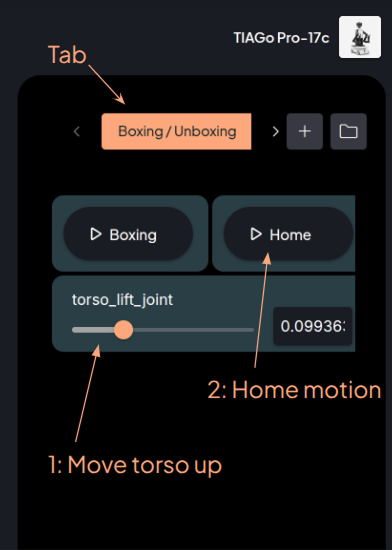
Figure 2: TIAGo Pro Unboxing tab
Stop the TIAGo Pro robot
Follow the instructions to stop the robot: 1. Turn the PC off 2. Turn the electronics off.
Put TIAGo Pro in the Flightcase
When the robot is off and in the boxing configuration, it can be put in the Flightcase.
The following video shows the whole process.