Safety
The TIAGo Pro robot has two fixed emergency buttons on the robot and a remote emergency button with a 2.4 GHz mesh radio link. The fixed emergency buttons are located on the back of the robot: one on top of the torso next to the on/off button, and another one on the mobile base (see Figure 1).
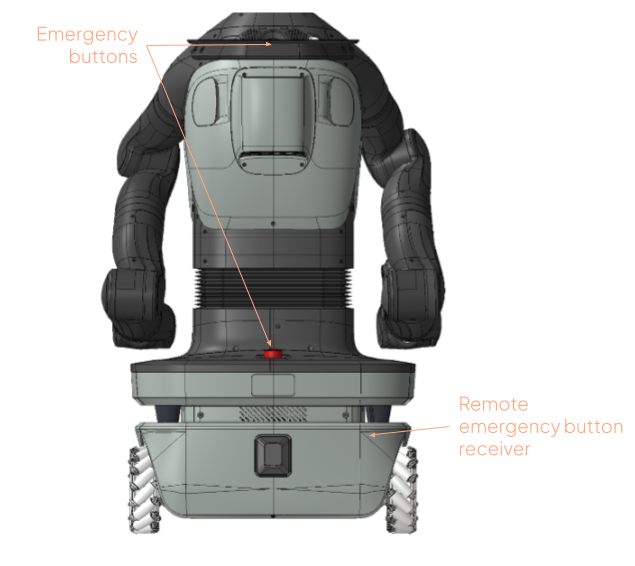
Figure 1: Location of the emergency buttons of TIAGo Pro.
The wireless emergency button receiver (Figure 2, left) is located in the mobile base and provides a working range of at least 10 m with the pocket radio emergency button (Figure 2, right). All three emergency buttons have the same effect: once pressed, they cut power to all motors. The onboard PCs are not shut down, allowing data retrieval for diagnostic purposes.
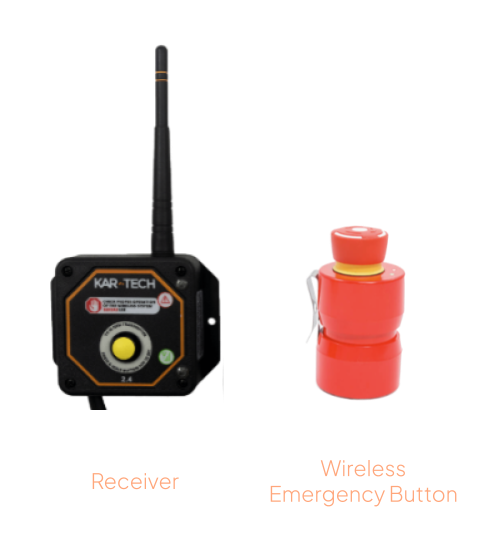
Figure 2: Wireless emergency stop with 2.4 GHz mesh radio link. Left: receiver. Right: wireless emergency button.
Upon pressing any emergency button, the brakes in the first six joints of each arm are engaged. This results in a complete stop of the platform.
In case of emergency, the arms can be moved without a power supply by manually deactivating the brakes one by one. This requires removing the arm covers, which provide easy access to all joint brakes.