Network Topology
The router acts as a gateway and bridge between external and internal networks. The internal LAN uses the subnet 10.68.0.0/24, with static IPs assigned to critical components.
Default internal IP addresses
| Device | IP |
|---|---|
| Control PC | 10.68.0.1 |
| Multimedia PC | 10.68.0.2 |
| Router | 10.68.0.5 |
| Jetson 1 | 10.68.0.11 |
| Jetson 2 | 10.68.0.12 |
| DHCP range | 10.68.0.200–210 |
The internal LAN is bridged across:
- All Ethernet ports (ether1 to ether5)
- The internal WiFi access point (
wifi_AP) - The WireGuard LAN interface (
wireguard_LAN)
External connectivity is provided by:
- The client WiFi Interface (
wifi_CLIENT), that connects to site WiFi, and - The
wireguard_WAN, that connects to the PAL VPN.
The router routes traffic between LAN and WAN interfaces with NAT and firewall rules. See Figure 1 to see a full overview of the Network topology.
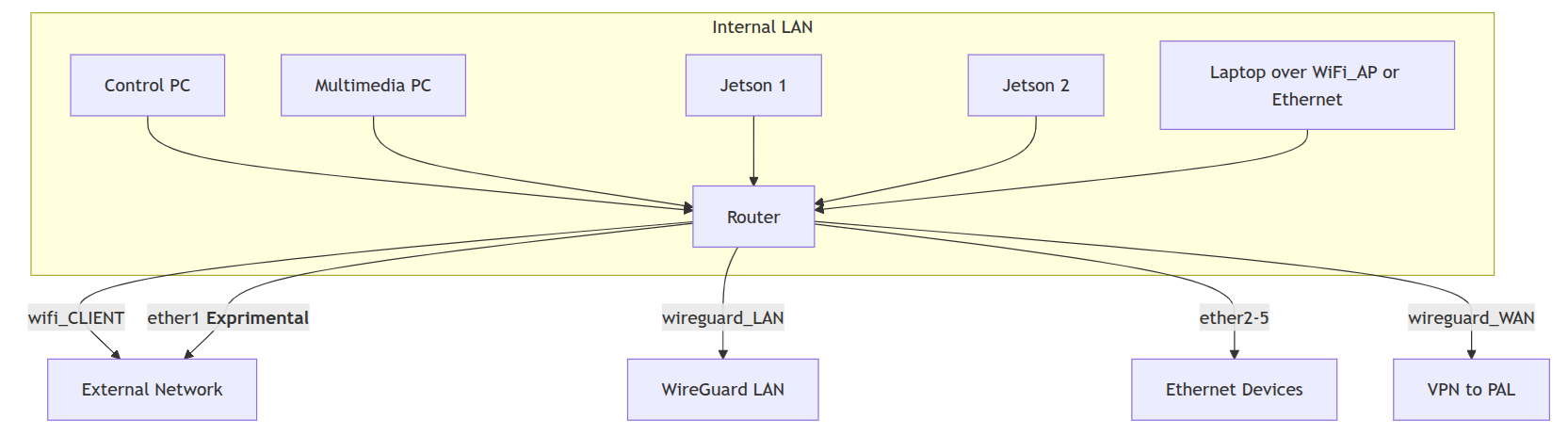 Figure 1: TIAGo Pro Network Topology.
The VPN tunnel provides remote access to all 10.68.0.X hosts via WireGuard.
DNS entries (e.g. control.pal-local) are registered on the router for hostname-based access. This setup allows developers to work locally or remotely without reconfiguring ROS 2 or SSH.