Firewall and NAT
The Mikrotik router includes a set of firewall rules and NAT to secure the robot and manage traffic between its interfaces.
These rules are defined in the .rsc file and should be reviewed before making any modifications to it.
Firewall input chain
Controls incoming traffic to the router itself: - Accepts ICMP (ping) and SSH on port 22 - Accepts VPN traffic on port 51820 (WireGuard LAN) - Allows all input from LAN, drops untrusted WAN traffic - Blocks invalid or malformed TCP connections
/ip firewall filter
add action=drop chain=input connection-state=invalid
add action=accept chain=input protocol=icmp
add action=accept chain=input dst-port=22 protocol=tcp
add action=accept chain=input dst-port=51820 in-interface=wifi_CLIENT protocol=udp
add action=accept chain=input connection-state=new
add action=accept chain=input connection-state=established,related,untracked
add action=accept chain=input in-interface=!wifi_CLIENT
add action=drop chain=input in-interface=wifi_CLIENT
Firewall forward chain
Controls routed traffic between interfaces: - Allows all traffic between VPN peers - Accepts LAN-to-VPN and VPN-to-LAN traffic - Accepts forward for all established and related connections
/ip firewall filter
add action=accept chain=forward in-interface=wireguard_WAN out-interface=wireguard_LAN
add action=accept chain=forward in-interface=wireguard_LAN out-interface=wireguard_WAN
add action=accept chain=forward in-interface=wireguard_LAN
add action=accept chain=forward connection-state=established,related,untracked
NAT configuration
NAT is enabled on outgoing interfaces to allow private IPs to access external networks.
This is important when using the robot's WiFi client for internet access.
/ip firewall nat
add action=masquerade chain=srcnat out-interface-list=WAN
Note
All interfaces assigned to the WAN list (like wifi_CLIENT) will be NATed.
You can review and modify these lists via in the router configuration in the tab Interfaces --> Interface Lists, see Figure 1.
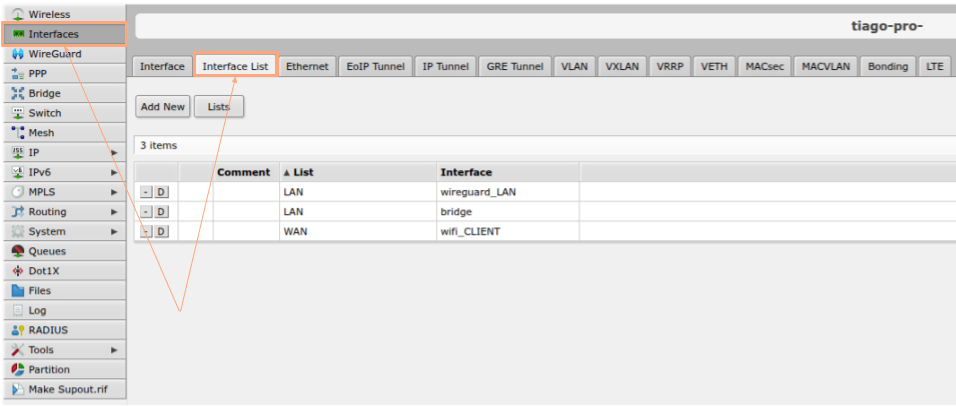 Figure 1: Interface lists.
Be careful when modifying NAT rules, as an incorrect configuration may block access to the robot.