Use the Allegro hand
This tutorial will guide you through the process of attaching and controlling the Allegro Hand in the TIAGo Pro robot.
Step 0: Mount the Allegro Hand
The Allegro hand can be mounted directly on the tool changer of the TIAGo Pro Arm or after the FT sensor. Mounting the Allegro Hand physically just consists of attaching it and closing the lever of the quick tool changer. As for the gripper, there is only one way to connect it. See Figure 1.
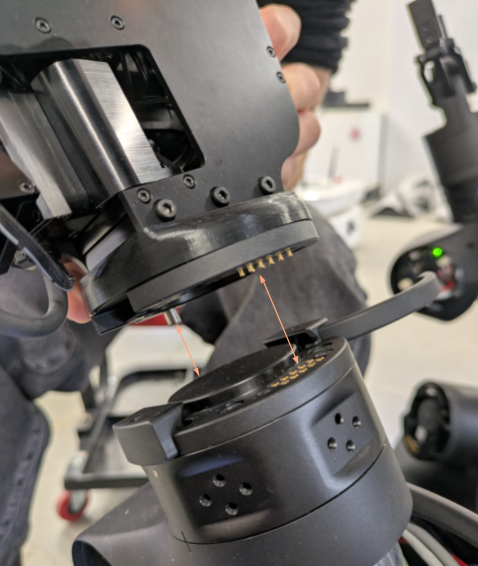
Figure 1: Allegro hand attachment.
From the software perspective, whatever combination you use, it has to be reflected in the robot_info. Do
pal robot_info list
To see which end-effector the robot thinks it has, see Figure 2.
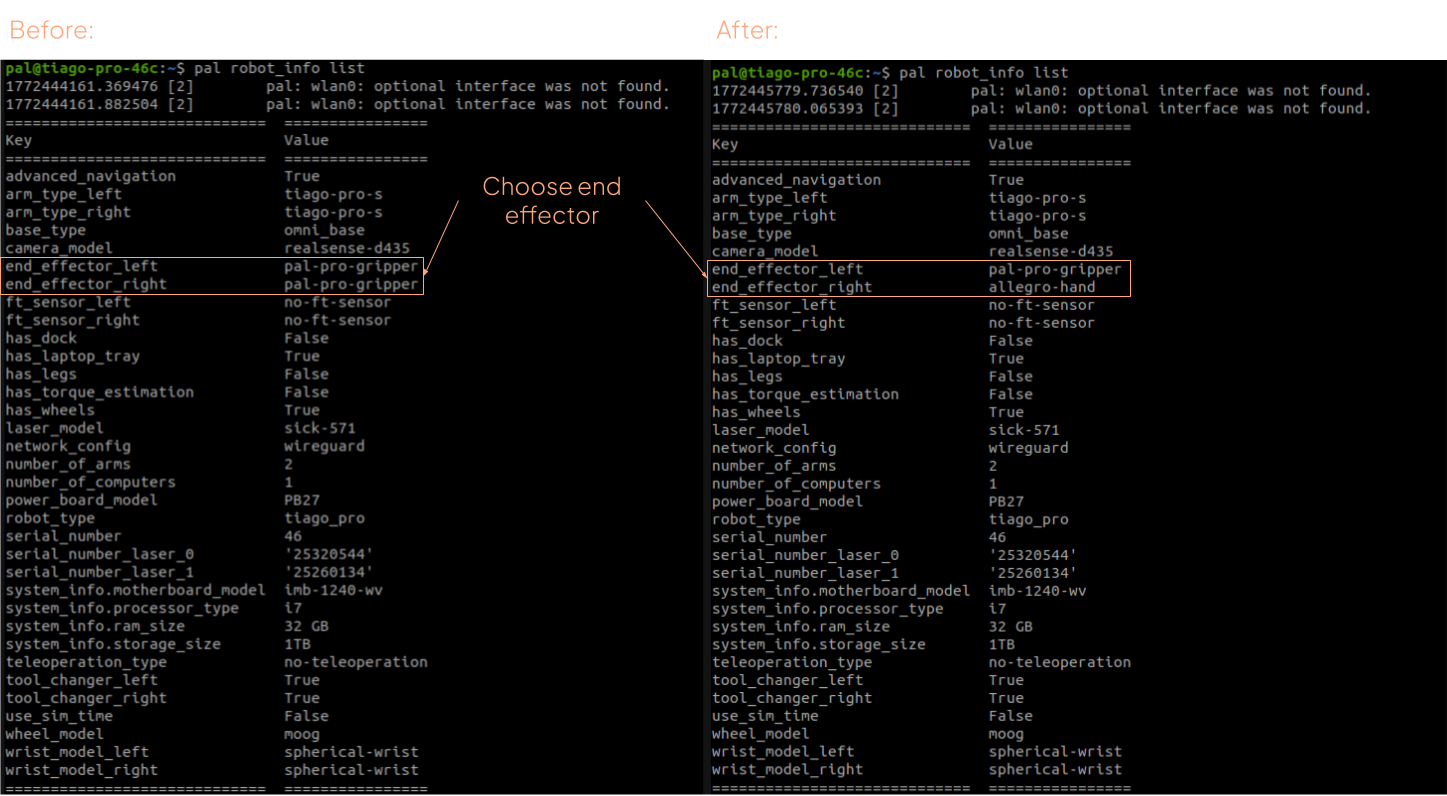
Figure 2: PAL robot_info end effectors.
To set it to Allegro Hand, do
pal robot_info set end_effector_<side> allegro-hand
and then
pal module_manager restart
Attention
Once the allegro-hand has been set in the robot_info, as there is a significant change in the communication bus topology of the robot, you need to fully reboot it with the button on the back (robot PC) and with the key.
Step 1: Check that the Allegro hand is working
After the full reboot, in the robot, check that the allegro-hand appears in the side(s) it should, see Figure 2, right.
Check that the Allegro Hand is on: the switch on its side is up and the red light is on, see Figure 3.
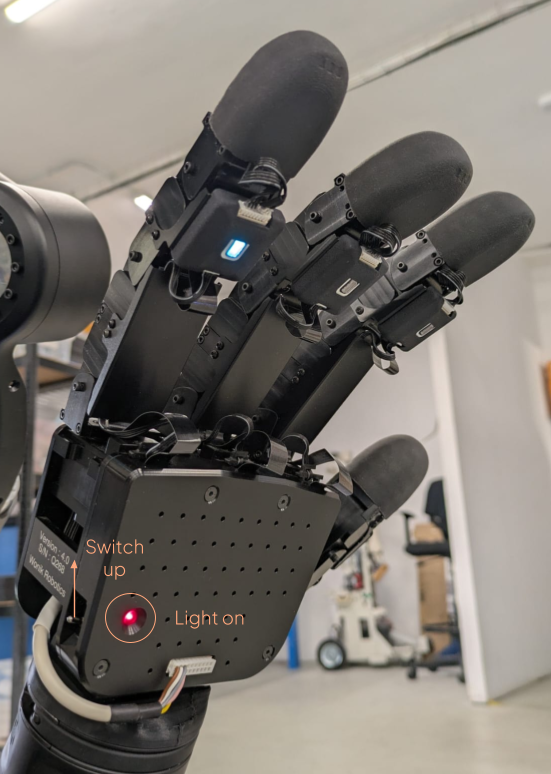
Figure 3 Allegro Hand on.
In the diagnostics, go to Hardware \(\rightarrow\) Allegro Hand, and it should be in green. See Figure 4.
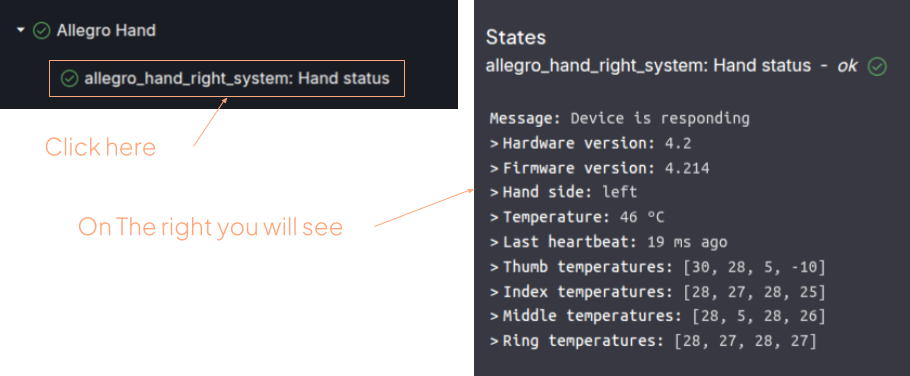
Figure 4: Allegro Hand diagnostics.
Step 2: Control the Allegro Hand in joint space
The default controller of the Allegro Hand is a joint space controller.
Examples for the left hand
Example 1:
ros2 topic pub /allegro_left_hand/joint_cmd sensor_msgs/msg/JointState "header:
  stamp:
    sec: 0
    nanosec: 0
  frame_id: ''
name: []
position: [0.6017, 0.2976, 0.9034, 0.7929, 0.1194, 1.2068, 1.0, 1.4042 ,0.0093,1.2481, 1.4073, 0.8163, -0.1116, 1.2712, 1.3881, 1.0122]
velocity: []
effort: []" --once
Example 2:
ros2 topic pub /allegro_left_hand/joint_cmd sensor_msgs/msg/JointState "header:
  stamp:
    sec: 0
    nanosec: 0
  frame_id: ''
name: []
position: [0.5284, 0.3693, 0.8977, 0.4863, -0.0312, 0.4, 0.6, -0.0, -0.1767, 0.4, 0.6, -0.0528, 0.1220, 0.4, 0.6, -0.0769]
velocity: []
effort: []" --once
Example 3:
ros2 topic pub /allegro_left_hand/joint_cmd sensor_msgs/msg/JointState "header:
  stamp:
    sec: 0
    nanosec: 0
  frame_id: ''
name: []
position: [1.0, 0.6331, 1.3509, 1.0, -0.0885, 0.4, 0.6, -0.0704, -0.0312, 0.4, 0.6, -0.0, -0.1019, 1.2375, 1.1346, 1.0244]
velocity: []
effort: []" --once
Examples for the right hand
Example 1:
ros2 topic pub /allegro_right_hand/joint_cmd sensor_msgs/msg/JointState "header:
  stamp:
    sec: 0
    nanosec: 0
  frame_id: ''
name: []
position: [0.6017, 0.2976, 0.9034,0.7929,
-0.1194, 1.2068, 1.0, 1.4042, -0.0093, 1.2481, 1.4073, 0.8163, 0.1116, 1.2712, 1.3881, 1.0122]
velocity: []
effort: []" --once
Example 2:
ros2 topic pub /allegro_right_hand/joint_cmd sensor_msgs/msg/JointState "header:
  stamp:
    sec: 0
    nanosec: 0
  frame_id: ''
name: []
position: [0.5284, 0.3693, 0.8977, 0.4863,
-0.1220, 0.4, 0.6, -0.0769, 0.0312, 0.4, 0.6, -0.0, 0.1767, 0.4, 0.6, -0.0528]
velocity: []
effort: []" --once
Example 3:
ros2 topic pub /allegro_right_hand/joint_cmd sensor_msgs/msg/JointState "header:
  stamp:
    sec: 0
    nanosec: 0
  frame_id: ''
name: []
position: [1.0, 0.6331, 1.3509, 1.0, 0.0885, 0.4, 0.6, -0.0704, 0.0312, 0.4, 0.6, -0.0, 0.1019, 1.2375, 1.1346, 1.0244]
velocity: []
effort: []" --once
Step 3: Control the Allegro Hand in Cartesian space
First change the default controller for the Cartesian controller using the ros2_control cli:
ros2 control switch_controllers --deactivate gripper_<side>_controller --activate gripper_<side>_controller_cartesian
A call of
ros2 control list_controllers
before and after switching controllers for an Allegro hand in the right arm should look as shown in Figure 5:
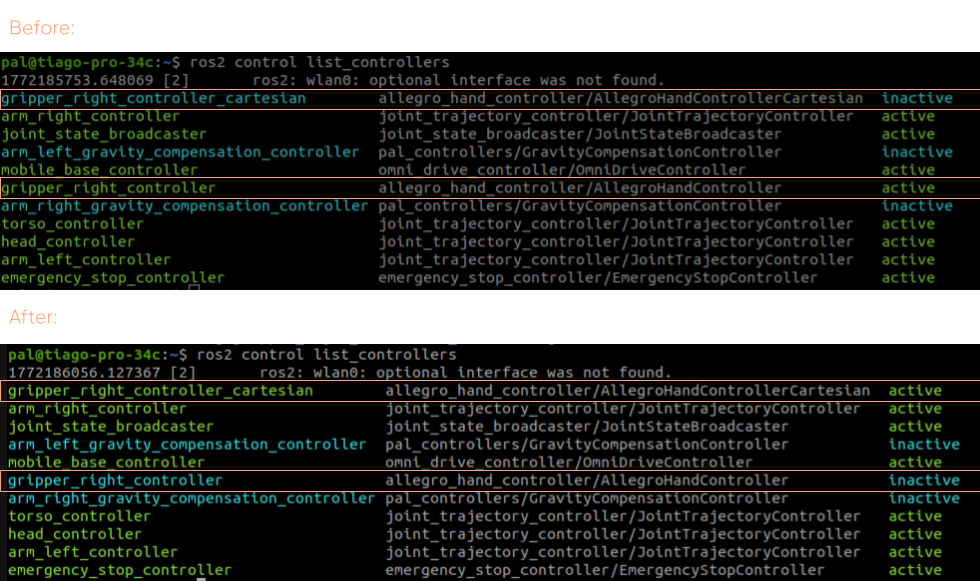
Figure 5: Switch controllers Allegro hand.
Examples for the left hand
Example 1:
ros2 topic pub /allegro_left_hand/fingertip_cmd allegro_msgs/msg/MoveFingertipCmd "gripper_thumb_finger_tip_link:
  layout:
     dim: []
     data_offset: 0
  data: [0.055682, -0.058339, -0.061227]
gripper_finger_1_tip_link:
  layout:
     dim: []
     data_offset: 0
  data: [0.064917, -0.040258, -0.004856]
gripper_finger_2_tip_link:
  layout:
     dim: []
     data_offset: 0
  data: [0.06573, 0.007341, -0.015815]
gripper_finger_3_tip_link:
  layout:
     dim: []
     data_offset: 0
  data: [0.054093, 0.040309, -0.032859]" --once
Example 2:
ros2 topic pub /allegro_left_hand/fingertip_cmd allegro_msgs/msg/MoveFingertipCmd "gripper_thumb_finger_tip_link:
  layout:
     dim: []
     data_offset: 0
  data: [0.023279,  -0.144279,  -0.039049]
gripper_finger_1_tip_link:
  layout:
     dim: []
     data_offset: 0
  data: [0.072218,  -0.04018, 0.095032]
gripper_finger_2_tip_link:
  layout:
     dim: []
     data_offset: 0
  data: [0.074637,  -0.003315,  0.100236]
gripper_finger_3_tip_link:
  layout:
     dim: []
     data_offset: 0
  data: [0.074795, 0.031111, 0.095533]" --once
Example 3:
ros2 topic pub /allegro_left_hand/fingertip_cmd allegro_msgs/msg/MoveFingertipCmd "gripper_thumb_finger_tip_link:
  layout:
     dim: []
     data_offset: 0
  data: [ 0.043017, 0.000341, -0.006440]
gripper_finger_1_tip_link:
  layout:
     dim: []
     data_offset: 0
  data: [0.074445, -0.059045, 0.100347]
gripper_finger_2_tip_link:
  layout:
     dim: []
     data_offset: 0
  data: [ 0.075771, -0.002365, 0.102011]
gripper_finger_3_tip_link:
  layout:
     dim: []
     data_offset: 0
  data: [0.070645, 0.034617, -0.020191]" --once
Examples for the right hand
Example 1:
ros2 topic pub /allegro_right_hand/fingertip_cmd allegro_msgs/msg/MoveFingertipCmd "gripper_thumb_finger_tip_link:
  layout:
     dim: []
     data_offset: 0
  data: [0.055682, 0.058339, -0.061227]
gripper_finger_1_tip_link:
  layout:
     dim: []
     data_offset: 0
  data: [0.064917, 0.040258, -0.004856]
gripper_finger_2_tip_link:
  layout:
     dim: []
     data_offset: 0
  data: [0.06573, -0.007341, -0.015815]
gripper_finger_3_tip_link:
  layout:
     dim: []
     data_offset: 0
  data: [0.054093, -0.040309, -0.032859]" --once
Example 2:
ros2 topic pub /allegro_right_hand/fingertip_cmd allegro_msgs/msg/MoveFingertipCmd "gripper_thumb_finger_tip_link:
  layout:
     dim: []
     data_offset: 0
  data: [0.023279,  0.144279,  -0.039049]
gripper_finger_1_tip_link:
  layout:
     dim: []
     data_offset: 0
  data: [0.072218,  0.04018, 0.095032]
gripper_finger_2_tip_link:
  layout:
     dim: []
     data_offset: 0
  data: [0.074637,  0.003315,  0.100236]
gripper_finger_3_tip_link:
  layout:
     dim: []
     data_offset: 0
  data: [0.074795, -0.031111, 0.095533]" --once
Example 3:
ros2 topic pub /allegro_right_hand/fingertip_cmd allegro_msgs/msg/MoveFingertipCmd "gripper_thumb_finger_tip_link:
  layout:
     dim: []
     data_offset: 0
  data: [ 0.043017, -0.000341, -0.006440]
gripper_finger_1_tip_link:
  layout:
     dim: []
     data_offset: 0
  data: [0.074445, 0.059045, 0.100347]
gripper_finger_2_tip_link:
  layout:
     dim: []
     data_offset: 0
  data: [ 0.075771, 0.002365, 0.102011]
gripper_finger_3_tip_link:
  layout:
     dim: []
     data_offset: 0
  data: [0.070645, -0.034617, -0.020191]" --once