Play_Motion2
PAL robots come equipped with a motion engine designed to execute predefined movements involving the upper body’s joints. It includes a default library containing various motions, and users have the flexibility to integrate new motions, playable at their convenience. The motions engine provided is the play_motion2 ROS 2 package.
play_motion2 architecture
Figure 1 shows the architecture of play_motion2.
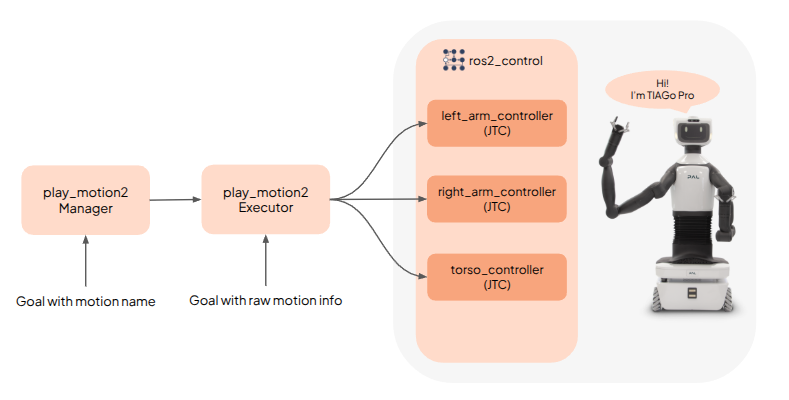
Figure 1: play_motion2 Architecture.
Play_motion2 is separated between a manager and an executor. Both allow the user to run motions, and maintains the legacy usage of the package in its original ROS version.
The manager allows to load, record, delete, etc. motions. There are corresponding services for each of these actions. In particular, at startup it loads all pre-recorded motions of the robot and makes them available for the user through it. The executor allows the user to run motions directly. This separation opens the possibility of running motions without having to have them recorded.
More specifically, when it comes to launching a motion, the user interacts with the manager buy providing a string that identifies the motion, while for the executor the user has to provide the full motion in a specific topuc. Manager carregar, gravar, manage motions. llegeix fitxers, etc. L'executor executes a motion.
The Motion Builder exploits this architecture, easing the procedure to record and build new motions, and then loading them in the robot, extending the list of the pre-recorded motions the robot comes with.
The following table lists the groups of actuated joints of TIAGo Pro that coincides with the MoveIt groups.
| Group of joints | Joints included |
|---|---|
| Torso | torso_lift |
| Head | head_1, head_2 |
| Arm left | arm_left_1, arm_left_2, arm_left_3, arm_left_4, arm_left_5, arm_left_6, arm_left_7 |
| Arm right | arm_right_1, arm_right_2, arm_right_3, arm_right_4, arm_right_5, arm_right_6, arm_right_7 |
| Gripper left | gripper_left_finger |
| Gripper right | gripper_right_finger |
The motions reproduced by play_motion2 are formulated as sequences pairs of joint positions and times. The joint positions are grouped in planing groups that follow the MoveIt convention. These motions are defined in configuration files, detailing the activated joint groups and the trajectory to replicate.
When triggering a pre-defined motion there is always planning in the first trajectory. This trajectory is the joint trajectory from the current position of the robot and the first position in the sequence of the predefined motion that has been triggered. This is done via MoveIt 2.
All the pre-recorded motions the TIAGo Pro robot comes with by default have been checked for not having any self-collision. Hence, if one of these are triggered, once the robot is in the first robot configuration the rest of the sequence can be runollowed directly with the Joint Trajectory Controller safely without any planning.
It is encouraged to check the best practices to generate these motions.
The play_motion2 documentation contains further instructions on the possible configurations of the package.